

Introduction
Used in animation, game design, architecture, manufacturing, and product design, 3D models play a vital role in all kinds of production—both digital and physical. Designing these 3D models can seem more mysterious than traditional art forms, but after a little practice using powerful 3D modeling software, it’s all very simple.
That said, there are many options to choose from when it comes to selecting your preferred 3D modeling software – each with advantages and disadvantages that make them more suitable for certain modeling jobs than others. With these differences in mind, choosing the right software for your purposes is crucial to realizing elements of your idea without wasting time using the wrong tools.
To help you choose, we’ve taken a long, hard look at the field and put together a list of the most popular and best-supported 3D modeling software.
1, Blender
The Swiss Army knife of 3D modeling software, Blender is an excellent free 3D design platform that offers a dazzling array of modeling tools at absolutely no cost.
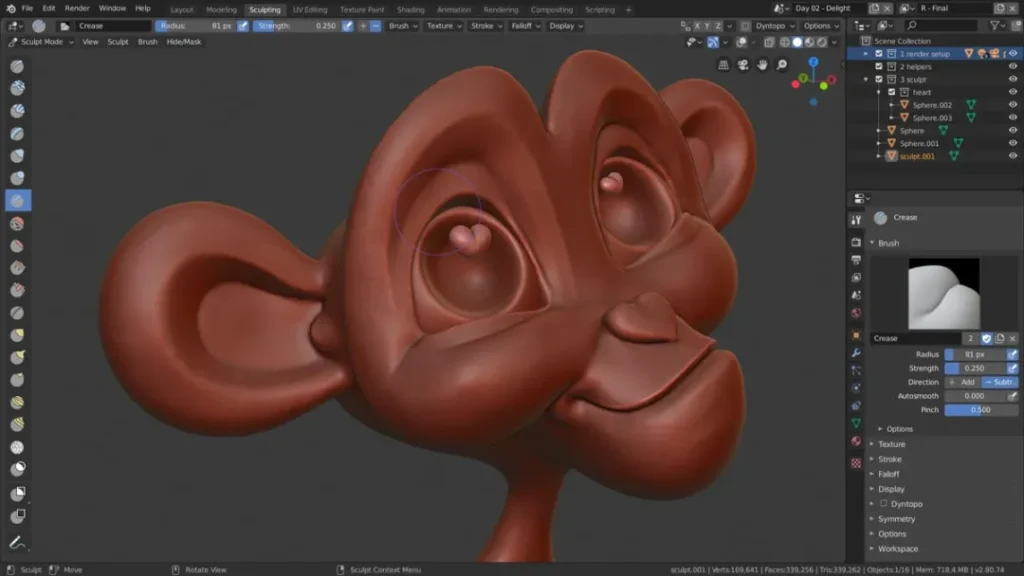
Ease of use:
There was a time when Blender was notorious for its excessive menu options and difficult learning curve, but that is no longer the case. A cleaner UI and huge support from the community make it easier for newcomers to find their footing.
characteristic:
Geometry Nodes: One of Blender’s most prominent features, which deprives other more expensive modeling software of a major selling point, is its geometry nodes. The procedural modeling workflow allows users to create designs by using a series of parameters and quickly implement them in an easy-to-use manner.
Cycles & Eevee: Cycles and Eevee are Blender’s renderers. Eevee is a real-time engine, while Cycles produces production-quality renders. Eevee uses rasterization to quickly create approximate renderings while simultaneously processing your model. The open-source render engine is a professional-quality physically based renderer, meaning it offers accurate ray tracing. A good renderer is essential for any 3D modeling software.
A Complete Suite of Pipelines: Given the breadth of this software, it’s hard to convey what makes Blender unique. While many of its features are standard among similar software, Blender boasts one of the most robust suites of features and workflows available in a single program, all for free. Whether you’re into mesh modeling, animation and rigging, sculpting, scripting, creating visual effects, editing video, rendering, or more, Blender has you covered with the essential tools to support it.
Blender also offers a full set of tools for the later stages of the production pipeline. You can easily use Blender for animation, rendering, video editing, or visual effects.
Although it is free and often used by beginners, Blender is extremely powerful and is the software of choice for many professional animation studios. Due to its low entry cost, its helpful community, its approachable interface, and its professional adoption and support, we believe Blender is the most extensible 3D modeling program to date.
Best suited for: Animation and mesh modeling.
2, ZBrush
Quite possibly the most advanced digital sculpting modeler on this list, ZBrush was once the main product of Pixologic before it was acquired by Maxon, the 3D software solutions provider behind Cinema 4D, in 2022. ZBrush is often a favorite tool among digital artists who prefer sculpting with “digital clay” rather than meshes or parametric modeling. Maxon also offers lighter (and more affordable) versions in ZBrush Core and ZBrush Core Mini (completely free), but ZBrush is where all the best features can be found.

Ease of use:
Because ZBrush is so specialized for digital sculpting, it’s also highly streamlined for use with this application. This sculpting program has a highly active community with tons of tutorials for every level of user. If you’re just getting started, check out the ZClassroom free tutorials from Maxon to familiarize yourself with the interface and set you in the right direction.
characteristic:
Huge Brush Array: ZBrush is probably best known for the amazing array of “brushes” (virtual sculpting tools) it offers for manipulating solid objects. These tools allow artists to easily sculpt digital clay without the hassle of carving out even the tiniest details as they would with real clay. There are over 300 customizable brushes loaded into the program by default. And, if that’s not enough, you can customize your own or just grab some third-party brushes from marketplaces like ZBrushGuides.
Smart Pixels: ZBrush can handle up to 100 million polygons per mesh, depending on your hardware, before you start to run into difficulties while modeling. The program’s unique software bypasses the traditional limitations of 3D voxels by using “Pixols” – a type of “smart pixel” (as Pixologic describes it). A pixel is essentially a 2D pixel with additional information representing depth attached, making it “2.5D.” After rendering, the pixels become familiar voxels.
DynaMesh Dynamic Base Mesh: If you need to stretch, deform, or otherwise add to your base mesh while you’re detailing a digital model, ZBrush has you covered with DynaMesh. This feature automatically refreshes the model’s topology, allowing you to dramatically reshape the base model without deforming its polygons. This feature may not replace subdivision in the later stages of design, but it will tighten your workflow in the early stages – saving you a lot of time and frustration.
Free ZBrushCoreMini or affordable ZBrushCore.
ZBrush: $39 per month / $359 per year for the full suite of tools, with no restrictions. You get access to the software’s wide variety of brushes and the ability to create or import your own, the program will work with up to 100 million polygons (if your hardware can handle it), and all of ZBrush’s features—like DynaMesh—are at your disposal.
ZBrushCore: $10 per month ZBrushCore is significantly more limited than the full ZBrush suite in all key respects. Users are limited to 20 million polygons per mesh and are only given 40 brushes – although users can still create custom brushes and import brushes made for ZBrushCore (not for ZBrush). Fortunately, DynaMesh is still available in ZBrushCore, but advanced rendering features like ray tracing are not. While ZBrushCore is more focused on hobbyists, the software can still be used for commercial purposes. Check out Maxon’s ZBrushCore comparison list to see what this version is missing.
ZBrush Core Mini: Free If you’re just looking to dip your toes into the world of ZBrush before spending any money, you still have an option. Maxon continues to offer an extremely limited edition of ZBrush Core Mini—nothing special, but it’s incredibly limited. Users are capped at just 750,000 polygons per mesh, there are only 12 brushes, and DynaMesh isn’t available. Users can still use some Virtual Displacement Meshes (VDMs), though this is a quick way to brush detailed 3D features onto models, which might be helpful for those just getting started. Perhaps most importantly, ZBrush Core Mini is strictly for non-commercial use.
Best suited for: Digital sculpting
3, Cinema 4D
Maxon’s animation powerhouse with advanced simulation capabilities, Cinema 4D, is often considered one of the programs behind some of the most captivating visual effects. In fact, Cinema 4D’s capabilities are so impressive that it’s used in visual effects-heavy Hollywood films. Marvel movies like Guardians of the Galaxy Vol. 2, Iron Man, and Spider-Man are all examples of the photorealistic illusions you can achieve with Cinema 4D.

Ease of use:
The well-organized interface and advanced features streamline modeling and animation workflows. Both new and experienced 3D artists can benefit from it, as the intuitive layout puts the most important tools right in front of you, allowing you to familiarize yourself with what you need most and speeding up the process for those who know what they’re looking for. Cinema 4D also has a great community around it, offering many tutorials and helping new artists get started. If you need to get started, you can check out the educational courses offered by Maxon University – a video tutorial project.
characteristic:
Mobile Photogrammetry: Building large, detailed scenes from scratch can be a daunting task. Creating the many small individual objects needed to populate a large, realistic scene requires a large team, pre-existing assets, or capture technology. Typically, the latter requires its own program, but Cinema 4D includes its own photogrammetry software called Moves to handle this. With Moves, users can easily capture real-world objects, scan them, and import them into the software.
Advanced Simulation: Simulation is perhaps Cinema 4D’s most famous feature. As models become more and more detailed, simulation becomes increasingly important. After all, hand-modeling every single strand of hair, or even manually placing every scattered object in a scene, can take a significant amount of time; if those details don’t look right, it can easily throw your entire model off. Cinema 4D has some of the best solutions around for creating simulations, like particle effects, but also practical tools like Dynamic Placement, which enables physics to fly as you place objects in a scene so they fall into natural, believable positions.
Procedural Polygon Reduction: Meeting design constraints is a tricky business, and designing a realistic model with a relatively low resolution can sometimes require more work than designing something highly detailed. Cinema 4D’s polygon reduction tools make it easy, so you can design your model at any resolution you’re comfortable designing and simply use the procedural tools to reduce polygons to meet your constraints later. Its benefits go beyond simply allowing you to design at your preferred resolution, though. Simple polygon reduction makes it easy to use past designs as original background assets without slowing down your workflow with more polygons than necessary.
At $116 per month or $983 per year, however, it’s still more affordable than any other on this list.
Best suitable for: Simulation and special effects
4, 3Ds Max
3ds Max has a long history in 3D modeling, dating back to the early 1990s when it was known as Studio 3D. In the late 1990s, it was acquired by Autodesk and has gone from strength to strength as the software of choice for many visual effects and motion designers to build their digital creations.
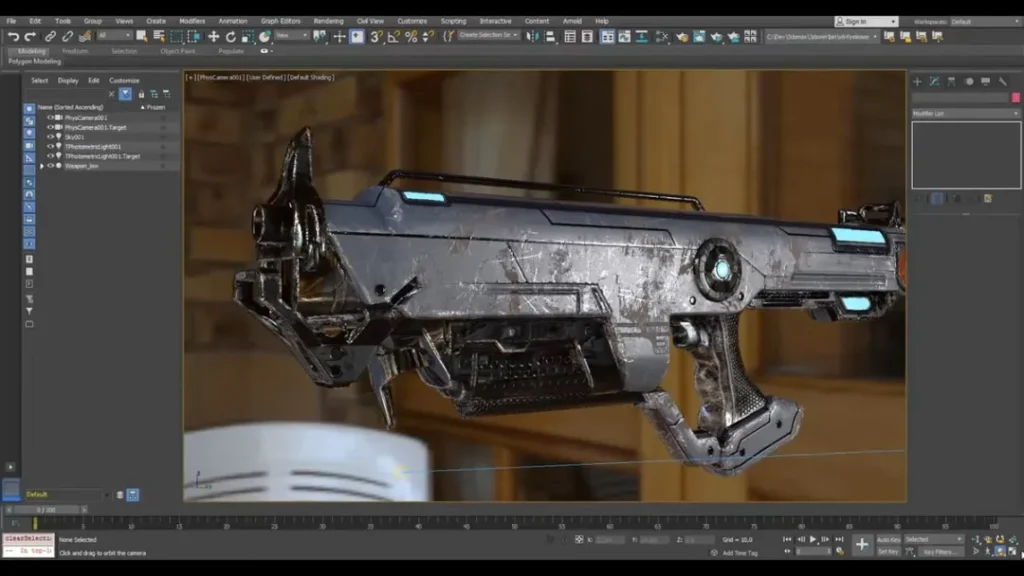
Ease of use:
3ds Max is probably the hardest software to learn on this list. Its UI is quite obtuse, so it will likely have the biggest learning curve for users who are new to 3D modeling.
Autodesk does have some educational content in its support pages to help new users, but it’s minimal compared to the educational libraries of other software. 3ds Max also has one of the smaller communities among digital modeling software. There are still dedicated creators producing excellent tutorial content, but it’s nowhere near the depth of other more popular software.
While its ease of use and community may be lacking compared to some of today’s popular 3D modeling programs, 3ds Max’s long presence on the market has resulted in a large number of plugins and libraries that provide greater functionality outside of its already quite complex feature set – meaning you’re likely to find more third-party tools that allow you to use it more easily than with other software.
characteristic:
Smart Extrusion: Working with and creating new faces in 3ds Max using the Smart Extrusion system is incredibly intuitive. It allows users to extrude faces in incredibly flexible ways while maintaining the mesh’s well-formed form and automatically joining intersecting faces. Cutting and extruding along axes is as simple as you’d expect, but splitting and extruding along odd angles—even free-form cutting of polygons—is just as easy. Smart Extrusion is like Blender’s Extrude Manifold feature, but seems to work more seamlessly, making designing from the simplest primitives far less daunting.
Physical Camera: If you’re creating photorealistic renderings, it’s helpful to have camera controls that mirror real-world cameras. 3ds Max offers exactly that—a single camera view that allows you to control exposure, depth of field, motion blur, bokeh, other aperture controls, and more. For those who prefer working with real cameras to 3D modeling, this is a great feature that allows their existing skills to uniquely aid their digital design work.
Safe In-Scene Script Execution: As an Autodesk application, 3ds Max has some of the best security a 3D modeling program has to offer. One notable aspect is its safe in-scene script execution, which blocks scripts if they attempt to execute commands outside of the scene—such as by accessing an external directory on your PC. If you run scripts from third-party sources, this is an important feature, especially for larger teams. Fortunately, it’s also toggleable, so you can easily disable the extension to run an unusual script that you know isn’t malicious.
3ds Max is the most expensive application on this list. A license costs $235 per month, $1,875 per year, or $5,625 every three years. Thanks to Autodesk’s flexible token system, occasional users can also choose to spend six tokens at $3 each (for a total of $18) for 24 hours of unlimited access.
Best suited for: Mesh and procedural modeling
5, Modo
As a more accessible yet powerful 3D modeling and animation tool, Modo sits in the middle of this list. While it’s certainly powerful, it’s used less in professional environments than the other programs on this list, but its unique layout and functionality make it worth considering.
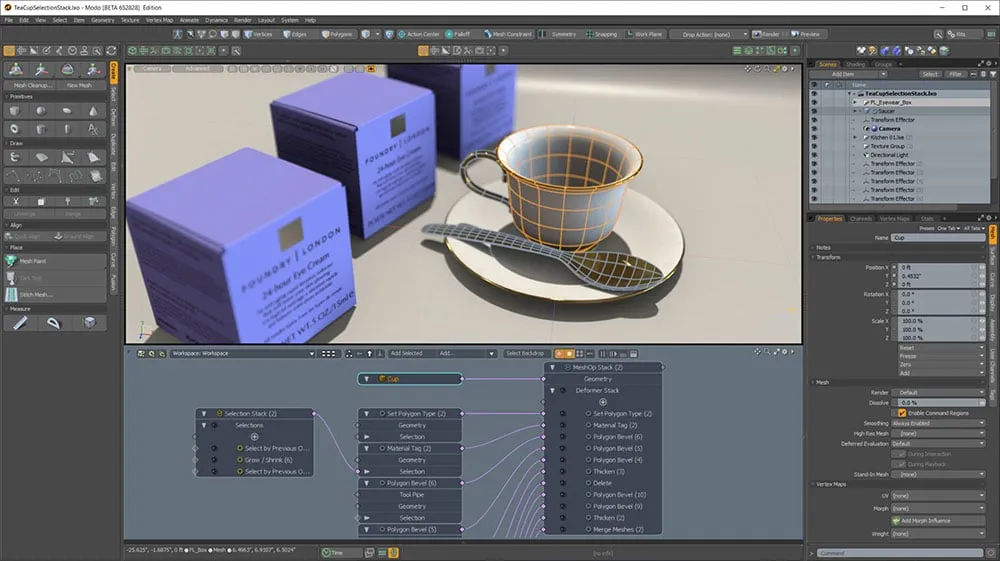
Ease of use:
With Modo, you get a sophisticated 3D modeling logic and a useful layout tab view. Its interface is highly customizable, so if you’re picky about something or want to experiment with your UI, it’s easy to tweak. The Foundry itself offers a wide variety of Modo tutorial content that should help familiarize you with the software or those new to 3D modeling, but there’s much less user content than with other programs.
characteristic:
MeshFusion: The software’s MeshFusion Boolean modeling space allows for greater flexibility when changing specific mesh properties. Designers can assign meshes a role, based on which they will interact with other meshes. For example, a mesh set to subtractive trimming will remove its shape from the positive mesh, while a mesh set to intersect trimming will remove everything on the positive mesh except where the two meshes intersect. It’s an intuitive way to build meshes, reminiscent of Boolean functions in some extremely simple CAD programs like Tinkercad – but Modo takes it to another level entirely.
Path Rendering Booleans: Modo has its own ray tracing system, called “mPath,” which makes it easy to animate Boolean operations while rendering. The simplest example is the one given in the Modo 15.2 release notes: Implementing a cutaway animation in a rendering. It shows a video of a product rendering with its outer shell cut away to reveal its copper interior. If you’re using it for product design, this feature is great for demonstrations, but it also has enough potential for presentations and simple animations regardless of your application.
Custom Tools: Compared to other 3D modelers, Modo has a customizable interface—but it also offers customizable tool variations. Using the program’s custom tool creation feature, called the “Tool Pipeline,” users can create new tools from the program’s more concise initial options, changing the way they feel and interact with their models. Embracing this level of customization may not be for everyone, but it does make Modo a uniquely customizable experience and allows it to limit tool bloat. Users can redesign tools to suit their needs and streamline their personal workflow in ways that other software can’t.
For individual users, Modo costs around $90 per month or $720 per year, putting it on par with more common professional tools. It’s worth noting that Foundry requires businesses to use a commercial license for an undisclosed price.
Best suited for: Direct and procedural modeling
6, Autodesk Maya
An industry standard for most of its 23-year lifespan, Autodesk Maya is powerful 3D animation software used by industry professionals for high-quality visual effects and motion graphics.
Work using Maya early in its lifecycle achieved notable success, solidifying the program’s status, and throughout the 2000s, a significant number of Best Visual Effects Academy Award winners were reportedly for films developed using the software.
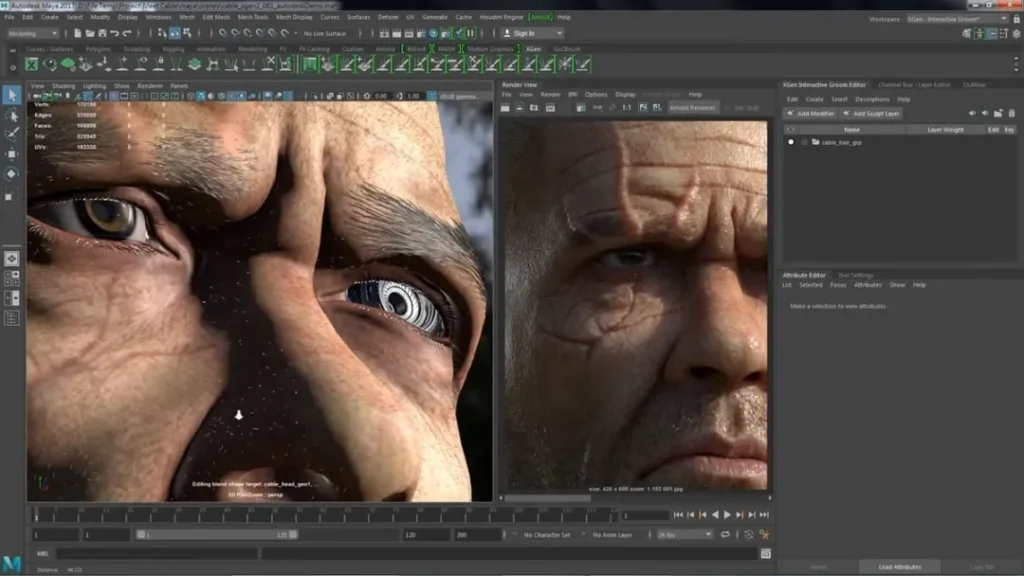
Maya is favored for its customizable workspace, allowing users to tweak the software to fit their workflow. 3D modeling capabilities come courtesy of Maya’s polygonal, NURBS, and sculpting modeling tools, plus a UV editing tool, but the confusing array of animation and rigging tools beyond pure modeling gives it an edge.
Some people like Maya’s cached playback feature, which makes viewing animations in real time smoother and faster than other 3D modeling software. Recent updates include a new user experience that makes it a softer landing through a gamified introduction to the software and key tools.
7, Unreal Engine
It won’t be long before you can do just about anything in the digital realm within Epic’s Unreal Engine tool. As of 2020, Unreal gained 3D modeling capabilities, allowing you to create assets and scenes directly within the engine, reducing the need to model in other programs.

It’s not as powerful as other more specialized software, but Unreal’s integration with Epic’s other product, Quixel, offers a huge benefit. As an Unreal Engine subscriber, you get access to Quixel’s massive Megascan library of photorealistic assets and can quickly bring them into Unreal using the Bridge tab.
This is a quick way to achieve realistic scenes, and if you are building a world for a game, you are already in the perfect environment to develop your models into interactive products.
Epic Games recently acquired Sketchfab, solidifying its future as a 3D modeling platform. Going forward, Sketchfab’s 3D asset marketplace will continue to be tightly integrated with Unreal Engine and Epic’s other 3D products.
But one of Unreal Engine’s best-selling features is that it’s free to use until gross revenue reaches $1 million, after which a 5% royalty becomes payable.
8, Houdini
Houdini is a 3D modeling software that excels at procedural generation and animation simulations. In popular films like Disney’s Frozen, Houdini is responsible for some of Hollywood’s most awe-inspiring shots.
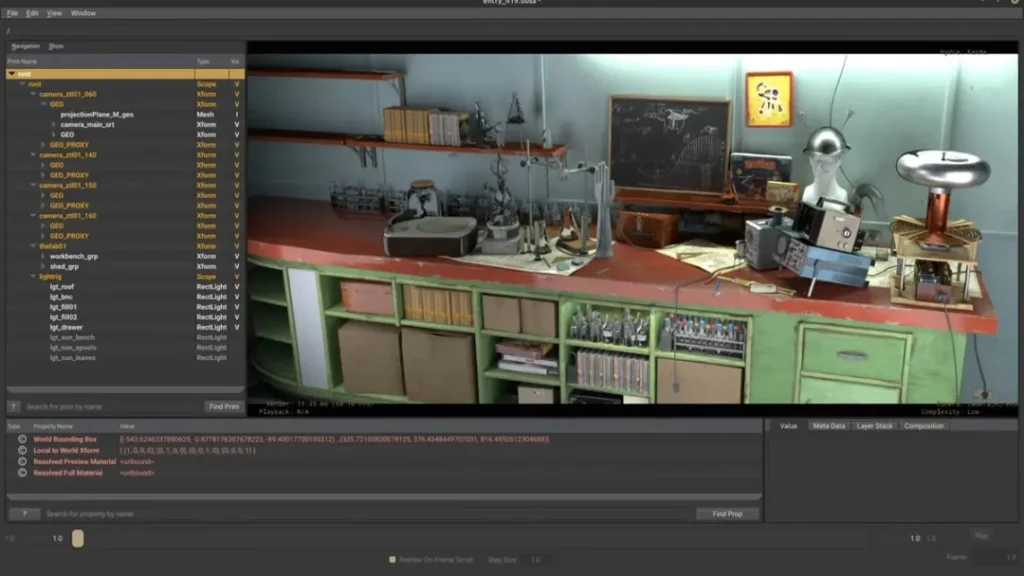
Its node-based workflow provides a simple overview of complex scenes, letting changes cascade through the project with minimal user effort. Procedural modeling tools make it easy to build large assets with consistency and a sense of place based on user rules.
Houdini is also available under standalone and free learning licenses – opening up the software to low-budget productions and ensuring creative scalability. It’s not free for commercial use like Blender, though Blender doesn’t come close to Houdini’s simulation capabilities.
9, Vectary
As a browser-only 3D modeling tool, Vector is unique among all other 3D modeling software. Despite this, the fact is that Vector is an extremely powerful tool for designers.
In Vector, you get a viewport to model your 3D creations using tools and shortcuts that Vector says take away the tedium of 3D modeling. The service is touted as being “built by 3D designers, for 3D designers,” and with its tools’ ease of use and speedy speed, it lives up to that.
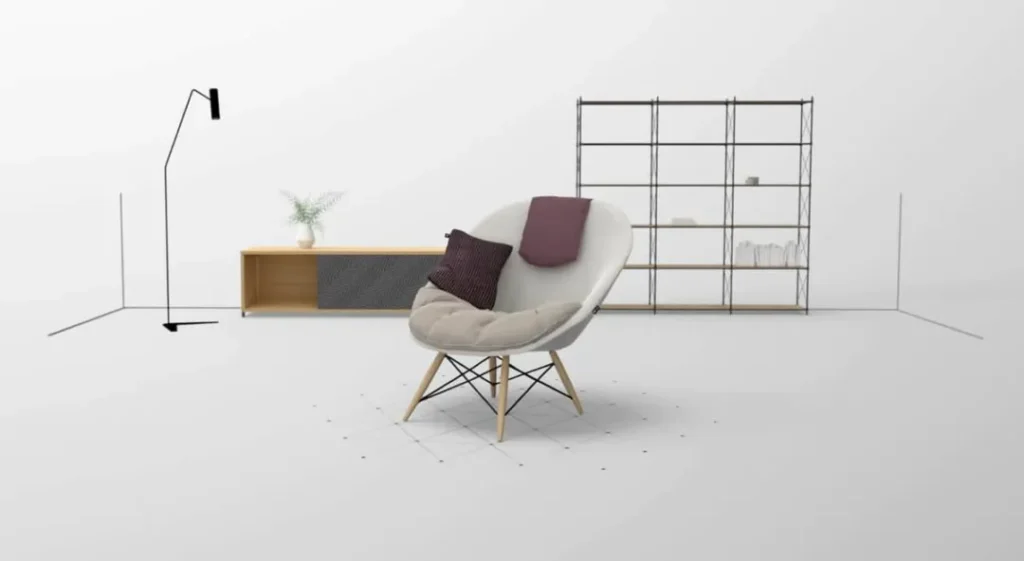
The changes you apply to your model in vector layers are non-destructive, making it easy to work backwards or make parameter adjustments dynamically.
Vector has an extensive library of assets that also make it quick and easy to populate scenes or composite new objects.
Vectary offers a free but limited version that caps at 10 projects. If you want to use it more professionally in your organization, you’ll need to sign up for a subscription to use the tool, which starts at $15 per month if you get an annual subscription.
10, Adobe Substance 3D Designer
Part of Adobe’s Substance suite of applications, Substance 3D Designer is a node-based painting tool that lets you build 3D assets and textures from scratch.

Two main modes are possible, where the solid map determines the 2D texture applied to the 3D model, and the model map, in a similar way, allows you to parametrically assemble 3D models.
Adobe has spread the functionality of many of its 3D modeling tools across several applications, a typical feature of its segmented cloud products. To control the entire pipeline of model production from scratch, you need the full Substance suite, but for basic model creation, Substance 3D Designer can go some way.